
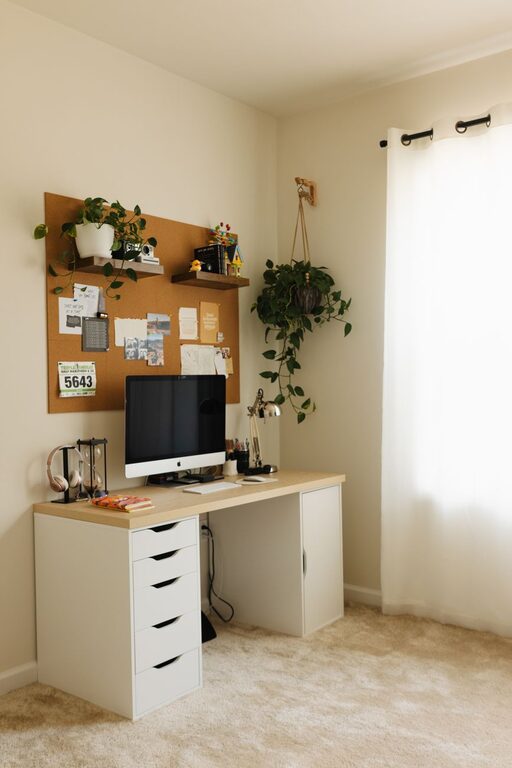
Creating a home workspace that feels both cozy and functional can significantly improve your productivity and well-being. Whether you’re working remotely full-time or just need a dedicated spot for occasional tasks, a well-designed work area makes a big difference. In this post, we’ll share practical tips to help you build a home workspace that blends comfort and efficiency.
1. Choose the Right Location
Finding the right spot for your workspace is the first step. Here are some factors to consider:
– Natural light: Position your desk near a window if possible. Natural light boosts mood and reduces eye strain.
– Quiet environment: Pick a space away from high-traffic areas to minimize distractions.
– Room for essentials: Make sure there’s enough space for your computer, documents, and any other tools you need.
Sometimes, a spare room is ideal, but if that’s not an option, a corner in your bedroom or living room can work just as well.
2. Invest in Comfortable Furniture
Comfort is key to staying focused through long work sessions.
– Ergonomic chair: Choose a chair that supports your back and encourages good posture.
– Proper desk height: Your desk should allow your elbows to rest at about a 90-degree angle when typing.
– Adjustable options: Consider height-adjustable desks or chairs to switch between sitting and standing.
Comfortable furniture not only protects your health but also helps you concentrate better.
3. Optimize Lighting
Good lighting reduces eye fatigue and creates a pleasant ambiance.
– Layer your lighting: Use a mix of natural light, overhead lights, and task lamps.
– Avoid glare: Position screens to prevent reflections from windows or lights.
– Warm vs. cool light: Warm white light creates a cozy atmosphere, while cooler white light can increase alertness.
A desk lamp with adjustable brightness lets you tailor light levels to your needs throughout the day.
4. Keep Your Workspace Organized
Clutter can distract and reduce efficiency. Organize your space with these tips:
– Storage solutions: Use shelves, filing cabinets, or desk organizers to keep supplies tidy.
– Minimalism: Only keep items you use regularly on your desk.
– Cable management: Use clips or sleeves to keep cords out of sight and prevent tangling.
An organized workspace encourages a clear mind and smooth workflow.
5. Personalize Your Space
Adding personal touches can make your workspace more inviting and motivating.
– Plants: Small indoor plants improve air quality and add a touch of nature.
– Art or photos: Display images or art pieces that inspire you.
– Color accents: Use colors you love through accessories like pillows, rugs, or mugs.
Personalization helps you feel more comfortable and less like you’re in an office.
6. Create a Tech-Friendly Setup
Technology is essential but can be a source of frustration if not managed well.
– Reliable internet: Ensure your workspace has strong Wi-Fi or wired internet access.
– Monitor setup: Using an external monitor can reduce eye strain and improve multitasking.
– Accessories: Invest in a good keyboard, mouse, and headset for better comfort and sound clarity.
Regularly update your devices and keep cables organized for a smooth digital experience.
7. Manage Noise and Distractions
Controlling your environment helps maintain focus.
– Noise-canceling headphones: Great for blocking out background noise.
– Sound machines: Try white noise or nature sounds to create a calming atmosphere.
– Clear boundaries: If you share your home, set expectations about your work time to minimize interruptions.
Small changes can lead to a much quieter and more productive space.
8. Keep Your Workspace Clean and Fresh
A clean environment supports mental clarity.
– Daily tidying: Spend a few minutes at the end of each day cleaning your desk.
– Airflow: Open windows or use fans to keep air circulating.
– Refreshments: Keep a water bottle nearby to stay hydrated.
Maintaining cleanliness helps your workspace feel pleasant and ready for work.
9. Incorporate Movement
Sitting for long periods can be tough on your body.
– Stretch breaks: Take short breaks to stretch or walk around.
– Standing options: Alternate between sitting and standing if possible.
– Exercise space: If room allows, add a yoga mat or small area for quick exercises.
Moving regularly boosts energy and reduces fatigue.
—
By combining these tips, you can create a home workspace that feels warm, inviting, and set up for productivity. Remember that comfort and organization often go hand-in-hand. Start small and adjust your space as you learn what works best for you, making your work-from-home experience more enjoyable and effective.